How to Grade Essays with FirstMarker
FirstMarker Team · March 26, 2026
How to Grade Essays with FirstMarker (And Why Your Rubric Matters)
Grading essays can be time-consuming and inconsistent — especially when relying on traditional rubrics designed for human interpretation.
With FirstMarker, you can automate essay grading quickly and consistently. However, to get the best results, you need to understand one key concept:
Not all rubrics are AI-friendly.
Why Traditional Rubrics Don’t Work Well with AI
Most classroom rubrics are:
- Visually designed (tables, boxes, diagrams)
- Ambiguous in wording
- Dependent on teacher interpretation
While this works for humans, it creates problems for AI systems like FirstMarker.
Common Issues:
- ❌ Vague descriptors like “good use of language”
- ❌ Missing scoring rules (how much is each section worth?)
- ❌ Visual layouts that don’t translate well to text
- ❌ Criteria that overlap or are not clearly separated
AI needs structured, explicit, and unambiguous instructions.
What Makes a Rubric “FirstMarker-Friendly”?
To get consistent grading results, your rubric should be:
1. Text-Based (Not Visual)
Avoid diagrams and graphic organizers. Use clear text instead.
2. Explicit Scoring Rules
Each criterion should define:
- What is being assessed
- What full marks look like
- What partial marks look like
3. Separated Criteria
Each skill must be independently graded:
- Ideas
- Vocabulary
- Mechanics
- Spelling
4. Defined Language
Avoid vague words like:
- “good”
- “some effort”
- “well written”
Replace them with measurable descriptions:
- “uses at least 3 descriptive (WOW) words”
- “includes all required sections”
Example: Weak vs Strong Rubric
❌ Weak (Human-Friendly Only)
Uses good vocabulary and interesting ideas.
✅ Strong (AI-Friendly)
Vocabulary:
- 3 marks: Uses 5 or more descriptive (WOW) words
- 2 marks: Uses 3–4 descriptive words
- 1 mark: Uses 1–2 descriptive words
- 0 marks: No descriptive words used
Step-by-Step: Grading Essays in FirstMarker
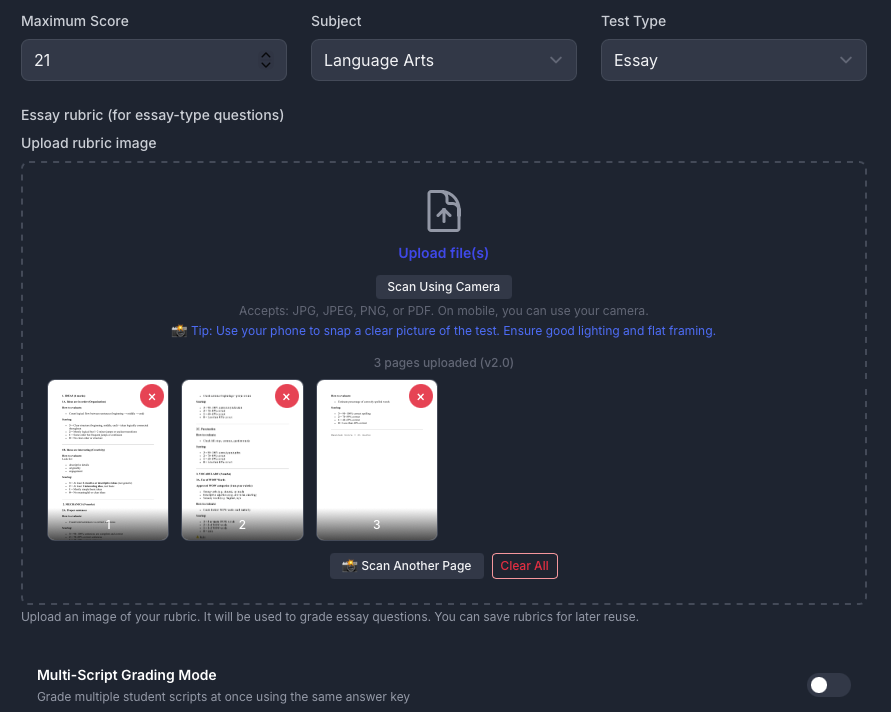
Step 1: Set Up Your Test

- Enter the test name
- Set the maximum score
- Select the subject
- Choose test type (Essay)
💡 Tip: Saved test names auto-fill these fields next time, making grading faster.
Step 2: Upload the Rubric

Upload your rubric as an image.
⚠️ Important: Even though you upload an image, your rubric should still be:
- Clear
- Structured
- Text-based in design
Step 3: Upload Student Work

- Upload scanned pages or images
- Ensure:
- Good lighting
- Clear handwriting
- Flat alignment
Step 4: Grade the Work
- Click grade
- FirstMarker analyzes the script
- Marks are generated based on your rubric
You can also:
- Run grading multiple times to check consistency
- Compare outputs
Pro Tips for Better Results
✅ Use Checklists Instead of Paragraphs
AI performs better with structured lists than long descriptions.
✅ Define “WOW Words”
Instead of saying “good vocabulary,” specify:
“Uses descriptive words such as: enormous, whispered, dazzling”
✅ Avoid Overlapping Criteria
Bad:
- “Creativity” and “Ideas” (too similar)
Better:
- “Includes all required ideas”
- “Uses descriptive language”
✅ Keep It Simple
More complexity ≠ better grading
Final Thought
FirstMarker is powerful — but it depends on how well you communicate your rubric.
The clearer your rubric, the more consistent your grading.
If you design your rubric for AI instead of humans, you’ll get:
- Faster grading
- More reliable scores
- Less frustration
Want Better Results?
Start by converting your current rubric into a clear, structured, text-based format — and you’ll immediately see the difference.